Saturday, November 21, 2009

Why is Zacuto so overpriced?

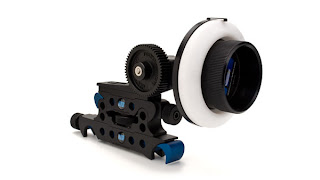
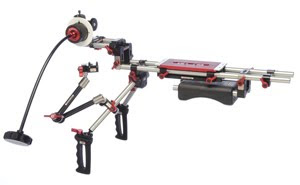
Even by "overpriced cinema gear" standards, their prices are laughable. Take this uncomfortable looking shoulder mount with rods and attached flimsy-looking follow focus for almost $5000:


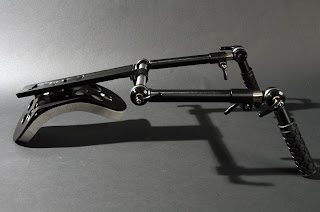
You could get a HH mount that's actually sturdy and comfortable from one of their competitors (Element Technica) for $2000:


... and a similarly flimsy looking follow focus from RedRock for $775:


...and then throw in a couple hundred bucks for a cheap baseplate and some rods, and you've got the same thing, except almost $2000 less, and probably a higher quality product.


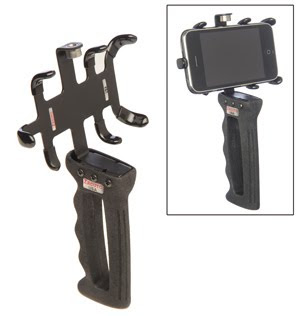
The only thing from Zacuto that interests me is their $70 Zgrip Iphone Jr:


...and only because of a little iPhone application called Artemis Director's Viewfinder, which allows the user to select a format/lens, and save pictures of the shots they lined up. This is even more useful than a traditional finder, because you can share with other people the shots you've lined up instead of having to describe them (i.e. "look through the finder here, put that pillar on your right of frame, and that bush on your left of frame, give her a little headroom, and that's basically what I was looking at")... versus just showing them a picture. Plus, you can line up and save shots on a location scout for future discussion and storyboarding. With the Artemis software + Zgrip, you can basically stop renting an optical finder. The only disadvantage is that it's obviously not as sharp, and doesn't show the depth of field of the lens, but that's a small price to pay for the collaboration potential.

Thursday, August 27, 2009

The Foundry releases shutter roll plugin

I am constantly following the DSLR situation, because I think we are on the verge of having something that is actually usable (again, not in the professional sense, but it would be good enough for stock footage, getting shots for a reel, or potentially a purely spec commercial).

Ideally what is needed from Nikon is a camera that shoots 720p24 without shutter roll, and with a decent codec (ideally 100mbit/s+, but the best we can probably hope for is a 'high' setting of 25mbit/s, which is still better than HDV).

The Foundry just released a shutter roll plugin for AE today
, which will fix the roll issue at the price of a lot of processing power. My guess is that it may also compromise the originally intended framing.

Thursday, August 6, 2009

D300S may not have shutter roll

A new video showing the video capabilities of the yet-to-be-relased Nikon D300S was released, and notably absent is the shutter roll that was visible in the D90 and D5000. This seems to be the only footage shot on the D300S to be released so far, and it's basically a commercial funded by Nikon, so it's obviously not going to show off the weaknesses of the camera. There are very few handheld shots in the video, which may be an attempt to mask the shutter roll, but the haldheld shot at 2:52 is something that wouldn't have looked as good on the D90. I doubt the shutter roll has been eliminated, but it may have been reduced significantly.

Saturday, August 1, 2009

Color 1.5

A lot of the new features announced for Color 1.5 (http://www.apple.com/finalcutstudio/) are expanded support (such as 4k compatibility, DPX compatibility, better support of Red and XDCAM files, and new hardware compatibility), which is appreciated, but two of the "features" are actually fixes for some of the gigantic design flaws of v1.0, and promise to make the application a lot easier to work with:


1. "Optimized Rendering" (a.k.a. marketing speak for "a rendering system that doesn't have a major design flaw")

Right now, if you render an project, and then go back and make changes to just a few shots, the software doesn't keep track of which shots now need to be rendered. So, you either have to individually add the changed shots to the render queue as you work, or re-render the entire project. The first option is extremely tedious, and the second option can be extremely time consuming. Finally, is v1.5, they claim to have fixed this issue. You can simply "add all unrendered" to the queue.


2. Seamless FCP integration (a.k.a. "something that should have been part of v1.0")

Color doesn't work well with things like speed changes, multiple layers, or basically anything more complex than a single video track with straight cuts. Apparently this will be completely fixed with 1.5. It looks like this is probably being accomplished by sending Color more information about the sequence in the XML file that is used to communicate between the applications.

Thursday, May 28, 2009

Update: DSLRs as motion picture cameras

In the one week or so since I posted about DSLRs, there has actually been several press releases about functional improvements to a few of the problems I listed. These improvements only scratch the surface of the mountain of issues that prevent DSLRs from being professional motion picture tools (the central reason is actually the attitude of the manufacturers that HD video on DSLRs is an added bell-and-whistle for still photo 'shooters', and not a primary function), but regardless, this week simprovements are worth listing:


1. The Foundry Demos Technology to Nuke CMOS Artifacts

This is actually month old news, but The Foundry is developing software that will remove the rolling shutter artifacts from footage, which is currently the #1 problem with the Nikon cameras. Even though this is helpful, I would assume that even on a high end computer, actually executing the motion estimation algorithm would take several seconds per frame, and add an extra step in the post-production process, not to mention extra storage for the export of the corrected files. It's clearly a fix, but an extremely inefficient one. If these cameras are ever going to be viable, the rolling shutter needs to simply not exist in the first place.


2. Firmware update for Canon 5D Mark II

Canon announced that in early June, they will have a firmware update that will allow for manual aperture, shutter, and ISO. This is a significant step that puts them leaps ahead of the current Nikon HD lineup (D90 and D5000), which in addition to automatic controls, also have the rolling shutter issue mentioned above. Canon seems to be taking professional filmmakers at least a little bit more seriously than Nikon.

Saturday, May 16, 2009

DSLRs as motion picture cameras


I have a collection of manual Nikon lenses and accessories and want Nikon to make a DSLR that can function as a (at least somewhat) professional motion picture camera so that I can actually shoot something with it. However, their initial offerings (the D90 and D5000) are purely consumer products leave a lot to be desired. In spite of this, a lot of people (I call them "shooters," not cinematographers, sorry for the condescension) have decided to actually try and make films with these products because they are in search of the magical "DoF" that their 1/3" video cameras lack.

Trying to shoot something with DSLR lenses (whether on front of a 35mm adapter or on an actual DSLR) is already a setback because still lenses aren't designed for motion picture photography, particularly because they have a lot of issues such as breathing and focus markings that aren't suitable for a focus puller.

Just to be clear, I don't expect Nikon or any other manufacturer to put out a professional product with a $1000 price tag, but there seem to be some people who think of these products as "almost there" or even acceptable for professional use. However, even some consumer camcorders in the $1000 price range have full manual controls and a higher bitrate than the D90. People are getting hooked in by the "DoF" and seem to be willing to throw everything else away for it.

Below are the issues that I've seen with the camera, based off video samples and literature. Only one of these issues are specific to Nikon HD DSLRs (the rolling shutter), and the rest actually apply to all of the HD DSLRs on the market today (currently there is one offering from Canon and one from Panasonic as well). The only advantages I can see with these cameras are that you could sneak them into places that don't allow motion photography, or have permit situations that are prohibitive.


1. Rolling shutter

Nikon employs CMOS sensors that scan the frame from top to bottom, left to right. Therefore, from the top the the bottom of the frame there will be a 1/48 sec exposure timing difference (I'm actually assuming that this is the duration of exposure for these cameras, but I'm not sure since it's not under manual control... more on that below). Regardless, this discrepancy in exposure causes a "jello" effect that has been very noticeable in 100% of the handheld work that I've seen, a good portion of all moving camera work, and even some shots that were locked off. Until Nikon works this out, I would say that it's the #1 issue with their cameras.


2. No real viewfinder

There's a reason that camera operators look through a high quality viewfinder. It allows them to:
  1. Check focus
  2. Check the frame at maximum resolution (either optically or electronically) for any issues that need to be taken care of by them (such as lens flares or anomalies), or issues that need to be reported to someone else (such as positioning of set dressing).
  3. It allows them to see the image in a totally glare-free environment.

Unfortunately, an SD LCD with a Hoodman attached to a D90 doesn't really cut it. Yes, this is what the operator looks at for steadicam shots, but thats because they don't have a choice.

It's certainly possible to shoot a film without a viewfinder, but it's a complete handicap for the operator, and you really don't want to shoot an entire movie that way.

One workaround is to do it Roger Deakins style and operate a remote head while looking at a full size HD monitor with a larger hoodman that can actually get the glare under control (the D90 does have HDMI out). However, if the production can afford a remote head, they probably aren't using a DSLR to shoot the film.


3. Bitrate

The encoder on the camera employs a variable bit rate, which seems to fall between 4-24 mbps depending on the complexity of the frame. Unfortunately, there is no way to set the bitrate manually, but some people have gone so far as to point the camera at a complex chart before shooting in order to force the camera into a higher bitrate for a limited amount of time.

4-24 mbps isn't high enough to produce an image that is viewable on a full rez HD display or projection without noticeable compression artifacts in at least some parts of the image. As a reference, DV is 25 mbps (albeit a codec that isn't as efficient), and DVCPROHD is 100 mbps.


4. No manual shutter or ISO

Nikon has promised to do a firmware fix for this, but it may take a while. This is a basic function that is needed for any kind of real image control.


5. No over/under cranking

Lack of overcranking is bigger issue than lack of undercranking, but my guess is that 24fps is the approximate maximum data throughput of the camera at this time. Lack of this ability pretty much precludes it from any use on commercials or music videos, and is still a major limitation for narrative filmmaking.
RSS feed

You can view updates as RSS by using this link with your reader:

http://feeds2.feedburner.com/cineblog-bkantor